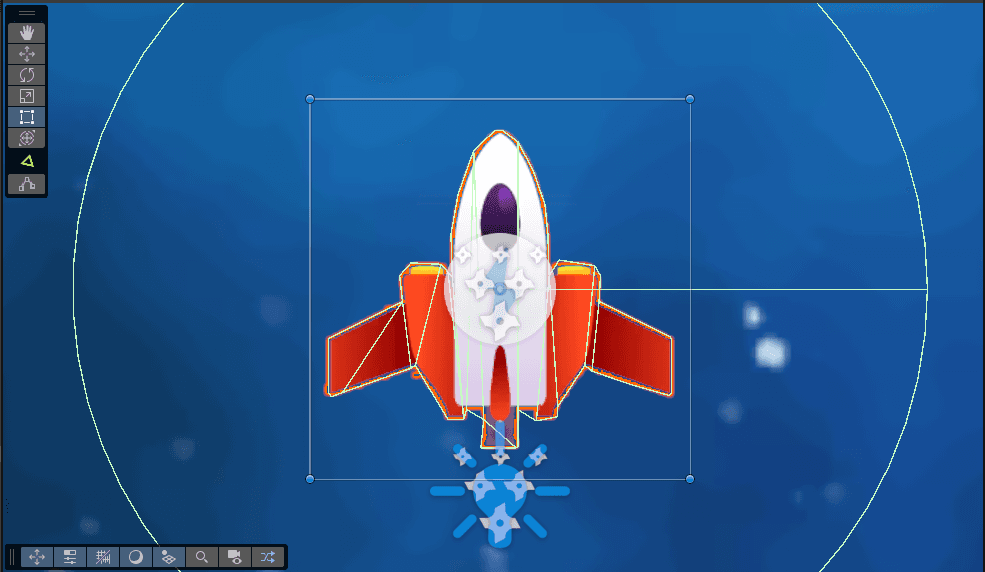
What is a 2D Collider?
A 2D Collider in Unity is a component that defines the shape of a GameObject for physical interactions. It allows GameObjects to detect and respond to collisions while keeping performance optimized for 2D games. These colliders interact with Rigidbodies and Physics2D components to simulate realistic physics.
Types of 2D Colliders
Unity provides several types of 2D Colliders, each suited for different use cases:
BoxCollider2D (Most efficient and commonly used)
- A simple rectangular collider.
- Useful for platforms, walls, and box-shaped objects.
CircleCollider2D
- A circular collider with a radius.
- Ideal for rounded objects like balls or wheels.
CapsuleCollider2D
- A capsule-shaped collider with rounded ends.
- Works well for character collisions.
PolygonCollider2D
- A flexible collider that conforms to the shape of a sprite.
- Useful for complex or irregularly shaped objects but can be computationally expensive.
EdgeCollider2D
- A line-based collider that does not enclose an area.
- Commonly used for terrain and open boundaries.
CompositeCollider2D
- Used in conjunction with other colliders to merge multiple colliders into one.
- Improves physics performance by reducing complexity.
Adding a 2D Collider
To add a 2D Collider to a GameObject:
- Select the GameObject in the Hierarchy.
- Click Add Component in the Inspector.
- Search for and select the desired 2D Collider.
- Adjust its properties to fit the object's shape.
Enabling Collision Detection
For a 2D Collider to detect collisions, the GameObject must also have a Rigidbody2D component. The type of Rigidbody2D you choose affects how the object interacts with physics:
- Dynamic Rigidbody2D: For objects affected by gravity and physics forces.
- Kinematic Rigidbody2D: For objects that move but do not react to physics forces.
- Static Rigidbody2D: For objects that do not move at all.
Detecting Collisions with Triggers
If you want an object to detect collisions without blocking movement:
- Enable Is Trigger in the Collider's properties.
- Use OnTriggerEnter2D(), OnTriggerStay2D(), and OnTriggerExit2D() in a script to detect interactions.
void OnTriggerEnter2D(Collider2D other) {
    Debug.Log($"Collided with: {other.gameObject.name}");
}
Handling Physics-Based Collisions
For non-trigger collisions, use OnCollisionEnter2D(), OnCollisionStay2D(), and OnCollisionExit2D():
void OnCollisionEnter2D(Collision2D collision) {
    Debug.Log($"Collided with: {collision.gameObject.name}");
}
Optimizing Collider Placement
Proper placement and scaling of colliders improve both performance and accuracy in physics interactions. Here are a few techniques:
- Ensure colliders match the sprite size to prevent unexpected collisions.
- Use multiple colliders for complex objects instead of relying solely on PolygonCollider2D.
- Adjust Physics2D settings to fine-tune how colliders react to different layers.
Best Practices
- Use BoxCollider2D where possible for performance efficiency.
- Use CircleCollider2D for rolling objects to ensure smooth interactions.
- Optimize PolygonCollider2D by reducing the number of points for better performance.
- Enable Is Trigger for interactions that don't require physics reactions.
- Adjust collision layers in the Physics2D settings to reduce unwanted collisions.
- Avoid excessive overlapping of multiple colliders as it can lead to unexpected behavior.
- Use CompositeCollider2D with Tilemaps or complex shapes to improve performance.
- Keep colliders as simple as possible to optimize physics calculations.
Conclusion
2D Colliders are essential in Unity for handling physics and interactions in 2D games. Understanding their types, uses, and best practices helps in optimizing performance and achieving the desired gameplay mechanics. Experiment with different colliders to find the best fit for your game!